Time travel for Postgres: What did this table look like at noon?
Streambed now supports time travel queries over your replicated Postgres data.
Pick a timestamp, add an AT clause to the table, and query a retained lakehouse snapshot through the same Postgres-compatible query server. Time travel works with both DuckLake and Iceberg targets, including joins across historical tables.
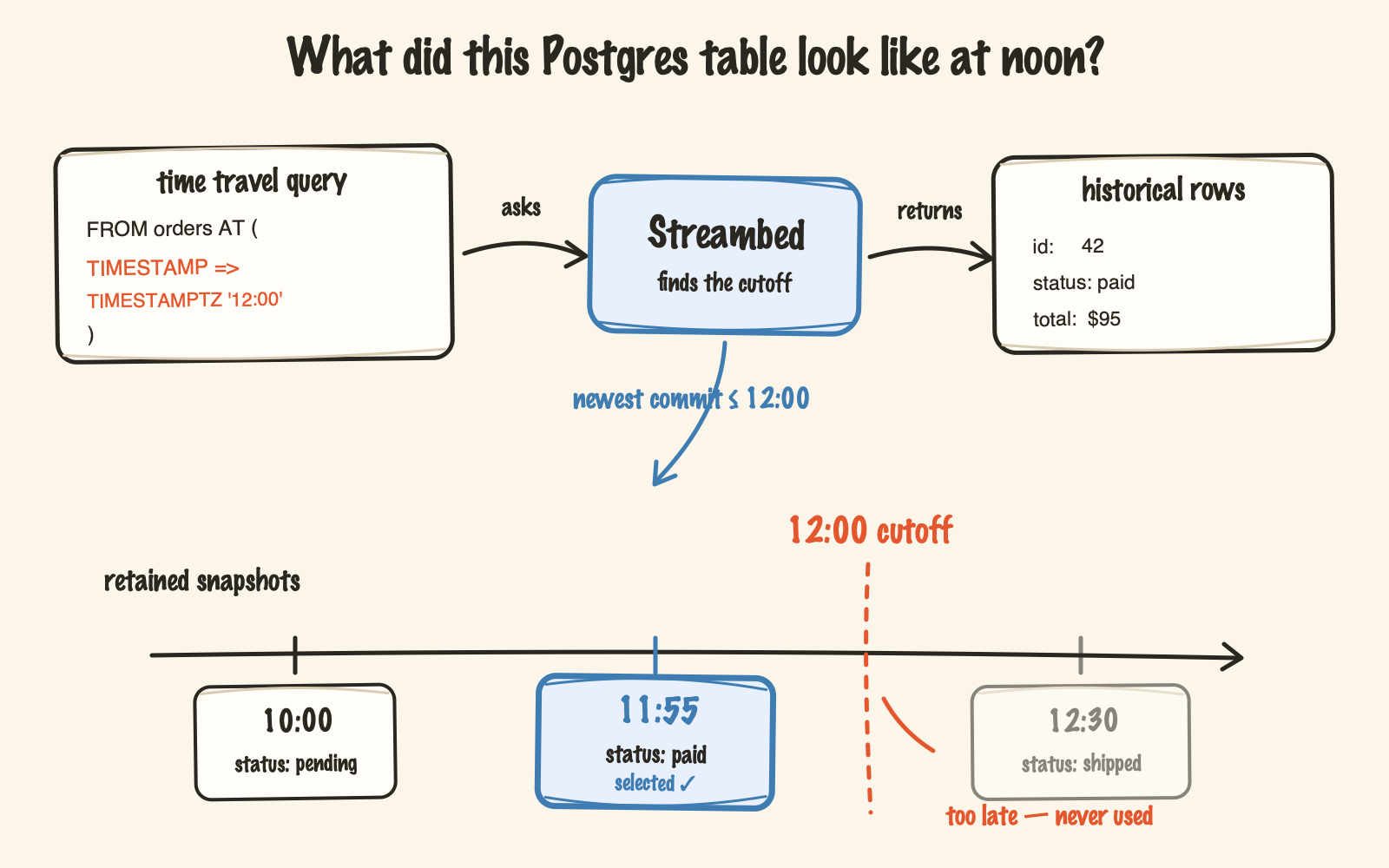
Time travel to an earlier table state
Suppose an order has changed, but you need to see what Streambed had committed at noon:
SELECT id, status, total
FROM orders AT (
  TIMESTAMP => TIMESTAMPTZ '2026-08-10 12:00:00'
)
WHERE id = 42;
The query selects the newest retained snapshot committed at or before the requested time. It never substitutes a later snapshot.
Normal queries still return the latest state:
SELECT id, status, total
FROM orders
WHERE id = 42;
This makes historical reads opt-in. Existing queries do not need to change.
Historical joins
Time travel is also available when a query needs more than one table:
SELECT o.id, o.status, c.name
FROM orders AS o AT (
  TIMESTAMP => TIMESTAMPTZ '2026-08-10 12:00:00'
)
JOIN customers AS c AT (
  TIMESTAMP => TIMESTAMPTZ '2026-08-10 12:00:00'
) ON c.id = o.customer_id;
Aliases appear before the AT clause.
V1 requires every historical table in one query to use the same instant. This keeps the query model clear and avoids accidentally joining tables from unrelated points in time.
A timestamp without an offset is interpreted as UTC. Explicit offsets are accepted too, so these refer to the same instant:
TIMESTAMPTZ '2026-08-10 12:00:00'
TIMESTAMPTZ '2026-08-10 14:00:00+02:00'
What can this help with?
Historical queries are useful when you need to:
- investigate how data looked before a deployment, update, or delete
- reproduce a report from an earlier committed state
- debug related tables without restoring a database backup
The history comes from snapshots that Streambed already creates while flushing CDC changes. There is no separate audit-table schema to maintain.
Find available snapshots
The new snapshots command lists retained history for a table.
For DuckLake:
./streambed snapshots \
  --target-format=ducklake \
  --table=public.orders
For Iceberg:
./streambed snapshots \
  --target-format=iceberg \
  --table=public.orders \
  --s3-bucket=streambed \
  --s3-prefix=test
The output includes snapshot timestamps and IDs, plus operation and WAL flush information when available. This gives you a concrete timestamp to use in a query and shows which historical states are still retained.
How Streambed time travel works
psqlsends the query through Streambed’s existing PostgreSQL-compatible query server.- Streambed validates the timestamp. DuckLake handles the
ATclause natively; for Iceberg, Streambed finds the metadata version containing the newest snapshot at or before the cutoff. - DuckDB reads the selected snapshot’s Parquet data and returns the historical rows.
One syntax, two targets
- DuckLake: tables at the requested time come from a shared catalog snapshot.
- Iceberg: each table independently selects its newest snapshot at or before that time, so a historical join is not one atomic cross-table commit.
Three details to remember
- The timestamp is Streambed’s lakehouse commit time, not the original PostgreSQL transaction time or a row’s
updated_atvalue. - Only retained snapshots are queryable. Once a snapshot and its files expire, that state is gone.
- In the current Iceberg implementation, deleting or truncating every row clears that table’s accessible snapshot history.